Check emails in Google Sheets
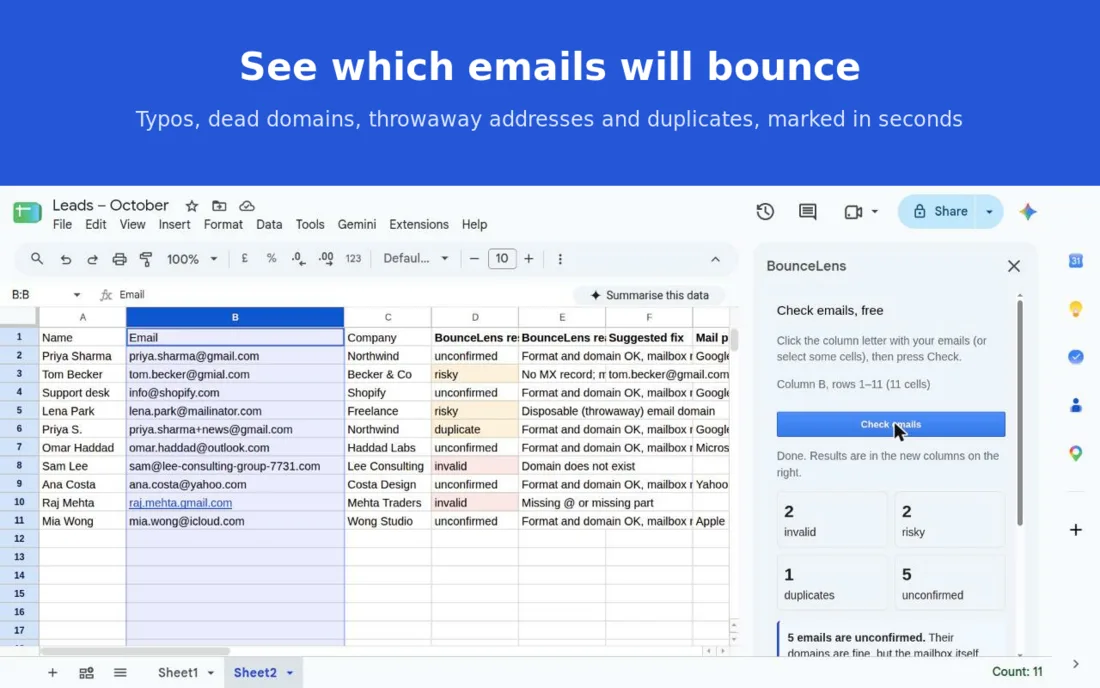
BounceLens is a free Google Sheets add-on. Select the column with your email addresses, click Check emails, and see which ones will bounce. The results are written in new columns next to your list.
Install from Google Workspace Marketplace
What it checks
- Format: broken addresses and missing parts, like
raj.mehta.gmail.com. - Typos: common misspellings of popular mail domains.
[email protected]gets the suggested fix[email protected]. - Dead domains: the domain doesn't exist or has no mail server (MX record).
- Throwaway addresses: Mailinator, 10minutemail and thousands more disposable domains.
- Shared inboxes: info@, sales@, support@ and similar role addresses.
- Duplicates: including Gmail dot and +tag copies of the same inbox.
No account, no API key, no credits.
Install
- Open the BounceLens listing and click Install.
- Choose your Google account and allow the permissions (listed below).
Or, inside Google Sheets: Extensions → Add-ons → Get add-ons, search for BounceLens and install it.
Check a list
- Open your sheet and choose Extensions → BounceLens → Check emails. The BounceLens sidebar opens.
- Click the column letter with your emails, or select just some cells.
- Click Check emails.
Four columns appear to the right of your sheet:
| Column | What it shows |
|---|---|
| BounceLens result | invalid (red), risky or duplicate (amber), or unconfirmed |
| BounceLens reason | Why, in plain words. For example "Domain does not exist". |
| Suggested fix | The corrected address, for mistyped domains |
| Mail provider | Who hosts the domain's email: Google, Microsoft, Proofpoint and others |
A header such as "Email" in the first row is detected and skipped. Up to 10,000 rows per run; for a bigger list, select a block of rows at a time. Run it again on the same column and it updates the same result columns.
What the results mean
| Result | Meaning | What to do |
|---|---|---|
invalid | Will bounce: bad format, the domain doesn't exist, has no mail server, or accepts no email. | Remove it, or ask for the right address. |
risky | Throwaway domain, likely typo, no MX record, or the DNS lookup failed. | Use the suggested fix if there is one, otherwise check it by hand. |
duplicate | Same inbox as an address higher up the list. | Keep one copy. |
unconfirmed | Format and domain are fine. | Keep it. The mailbox itself is not checked. |
The add-on never logs in to mail servers, so it can't tell whether a mailbox really exists. That's why addresses that pass are marked unconfirmed, not "verified".
Privacy and permissions
- See and edit only the spreadsheet you have open, to read the selected column and write the result columns.
- Show the sidebar inside Google Sheets.
- Connect to an external service: only Cloudflare's public DNS (
cloudflare-dns.com), to look up each domain's mail server.
The add-on runs in Google Apps Script under your own account. Only the domain part of each address (after the @) is looked up; the name before the @ never leaves Google. Your sheet data is not sent to BounceLens and nothing is stored. Details are in the Privacy Policy.
Not using Google Sheets?
- Email list checker: paste a list or upload a CSV in your browser.
- Remove duplicate emails and find typos on their own.
- Email check API, WordPress plugin and n8n node with the same checks.
Support
A question or a wrong result? Email [email protected]. If a result looks wrong, the domain (the part after the @) is enough. To remove the add-on, see the support page.